18

Is there any website that allows searching for (cheap) flight to any destination in a narrow time frame? Ideally I look for the cheapest flights while specifying only:

  • Departure airport (bonus if including nearby airports)
  • Time of departure and return within a few hours

Longer version: I like traveling around over the weekend. Often I fly out Friday evening after work and fly back on Sunday afternoon/evening/night to be back at work on Monday morning. Sometimes I even take an early flight on Monday morning and head straight to work. It doesn't really matter where I go and in fact I like to get as much variation as possible in my destinations. I just pick wherever flight happen to be cheap for a certain weekend. I am aware of website that allow to search for flights to "Anywhere", but for those that I am aware of you can only specify the days. Then, you get a list with destinations whereto flights are cheap, you pick one destination and get options for that destination. At this point you often can specify a time frame using some slider. This is then the point where you find out that the flights are leaving at impossible times (e.g. leaving on Friday morning while I'm still at the office). So, instead of having to specify the time range for each destination separately, I look for a website that allows me to specify this restriction for all destinations in one go.

Popular related questions, but not the same: How can I do a “broad” search for flights? and Cheapest flight to anywhere at any given time Those are both about flexible dates.

If no global solution exists, I will also accept an answer that works for the departure town that I care about (Brussels).

Some wandering yeti
  • 8,585
  • 1
  • 44
  • 57

4 Answers4

16

Skypicker can do the "anywhere" part, although not the hours:

Skypicker web site

When you select a departure airport, select To: Anywhere, and departure and return dates, the map on the right will then show the lowest prices to nearby destinations, and the left column will show destinations sorted by price, with the lowest priced destinations listed first.

If you selected One way, you will see one way prices, and if you selected Return you will see return (round trip) prices.

On the map, you can right click a city to select it as your origin, and left click a city to select it as your destination.

One quirk of this web site is that the form doesn't actually have a submit button. It tries to search as soon as you set dates. Because of this I noticed that it often got confused and would display expensive flights, or flights from the wrong city, or flights to my origin. You might want to go to the home page and start over if it seems to be giving you bad data.

Michael Hampton
  • 62,556
  • 7
  • 143
  • 263
7

I often do the exact same thing, the best solution I've found is Google Flights

You can search destination by continent such as Europe or North America. Put in your dates, Friday departure and Sunday Return. Then under the Times drop-down filter, change the sliders for an appropriate time, like 6pm outbound and whatever time for inbound.

This will then give you a map of the continent that you can browse through and select a destination you haven't been to before!

Not perfect, its missing a list view grouped by country, and I would need to change the dates to compare each weekend's prices. But there is a "lowest fares" option which opens a calendar control which can help to select the next travel dates.

Update: Seems like locale (which Google.com/flights site you get directed to) makes a big difference due to Google caching the results. I couldn't find the local flights page for Belgium, so the best alternative may be the French site, https://www.google.fr/flights or the dot com site www.google.com/flights.

2nd Update to show how the "anywhere" search within a specific time works

enter image description here

Further clicking on Expand map allows you to select a place of interest. After selecting a destination, a bar chart allows you to compare the prices for that weekend compared with other weekends.

enter image description here

EdmundYeung99
  • 3,816
  • 1
  • 22
  • 31
6

Yes, kayak can do this, to some extent. It works well if you have say, a top few destinations you can select from, but not 'anywhere'.

It's slightly limited in that you can only do 4 source or destination airports at once, but it's pretty decent.

I quite often look for trans-Tasman flights this way. So for example, say I want a one-way flight from NZ to Australia at the end of February:

https://www.kayak.com.au/flights/chc,akl,wlg-SYD,mel,bne/2015-02-28-flexible-1day-after

This searches all flights from Christchurch, Auckland, or Wellington to Sydney, Melbourne or Brisbane, over a couple of days.

Then once the flights have all loaded, the left side of the screen has a slider with times. It affects all flights, so if I say no flights earlier than 10am, it cuts out all of those.

You can do this for one-way or return flights, and adjust sliders for take-off times or landing times.

For another example, I may want to do a weekend trip from Sydney to one of the other major centers in Australia, in mid-February. You can tick 'nearby' airports, but that's not so useful in Australia (aside from Melbourne where you have MEL and AVV).

Anyway:

https://www.kayak.com.au/flights/SYD-mel,bne,cns,cbr/2015-02-13/2015-02-15 does this, showing all flights from Sydney return to Melbourne, Brisbane, Cairns or Canberra for the weekend.

I then adjust the sliders so I leave after work, and return to land before 10pm on Sunday so that I can still get home and get a decent sleep before work the next day.

Mark Mayo
  • 160,001
  • 106
  • 687
  • 1,492
2

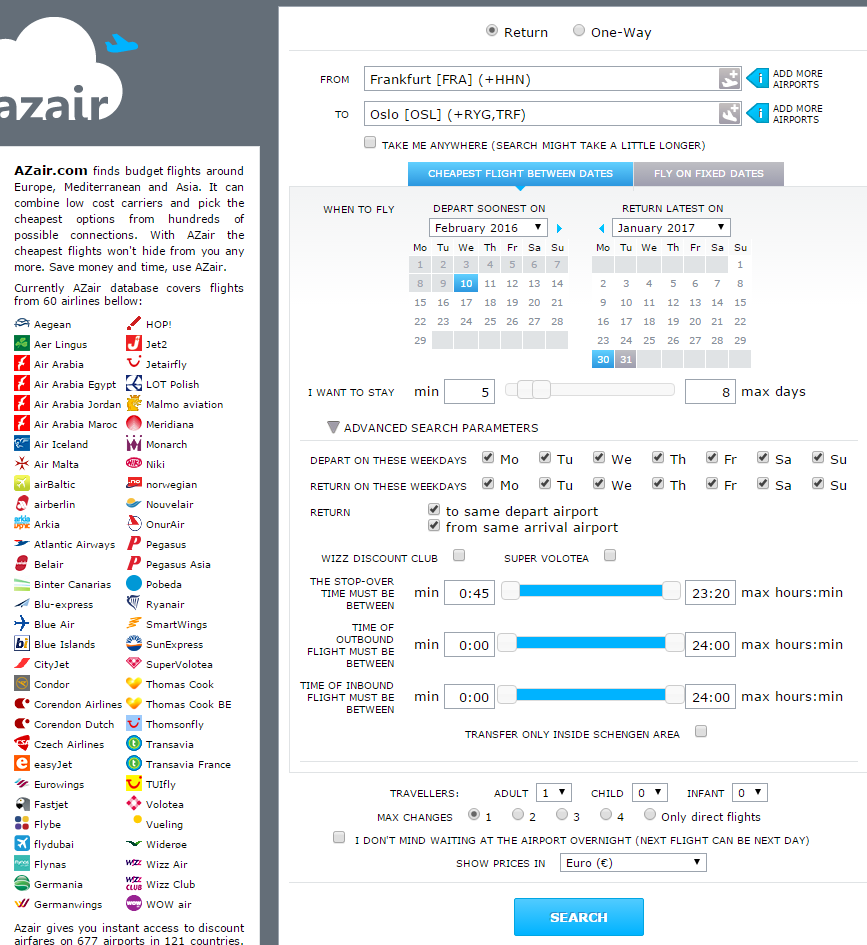
@chx has already mentioned Skypicker (now Kiwi.com) but a bit more powerful I find azair which has very powerful search options (see the advanced options), including choice of return and departure day, length of stay, period within which the trip should happen and a range of departure and arrival airports, up to the option "Take me anywhere" which is what you are looking for.

enter image description here

See also my answers in related posts here, here and here,

mts
  • 26,477
  • 17
  • 129
  • 244