60

Windows 10 has an extensive collection of lock screen photos, many of which have prompted a question here on Travel.SE.

Is there a website which lists the location of all of these photos? I imagine Microsoft has purchased an official license, so they should have a record about the photographer and the place where the photo was taken.

pnuts
  • 28,474
  • 3
  • 81
  • 175
JonathanReez
  • 82,178
  • 90
  • 394
  • 764

9 Answers9

38

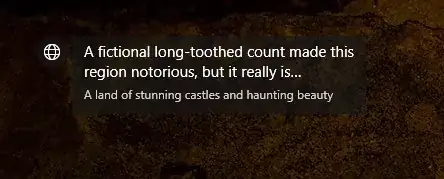
Windows 10 has added an update in the latest version allowing users to see where the photo came from. In the top-left corner of each lock screen there is now a short description of the location. Clicking the description opens a Bing search with the location's name.

enter image description here

In addition, the "Like what you see?" button now shows the location as well:

enter image description here

If you're unable to see the helpful tip, follow this guide from SuperUser. Finally you may try checking Wiki's article on Microsoft Spotlight which lists many of the previously used locations.

JonathanReez
  • 82,178
  • 90
  • 394
  • 764
12

The vast majority of Windows' lock screen images and wallpapers come from Getty Images. This has been so since at least Windows XP...

If you find the same photo on that site, there is almost always more information, such as location, photographer's name, and usage rights.

But they don't have a search by photo, so you'll have to search using Google Images' photo upload.

Michael Hampton
  • 62,556
  • 7
  • 143
  • 263
9

My Themes folder was empty as well. However, this worked for me. In your file explorer, go to:

C:\Users\<<Your-Username>>\AppData\Local\Packages\Microsoft.Windows.ContentDeliveryManager_cw5n1h2txyewy\LocalState\Assets

After adding '.jpg' to the filenames in that folder, you get a nice picture from Windows. If previewing the meta data doesn't help (because it's empty), just perform a google image search.

I wanted to know the location of the image below and was able to learn that it was taken in China.

hui hang trail china

gdrt
  • 2,293
  • 1
  • 19
  • 27
Lorenzo816
  • 91
  • 1
  • 2
7

Here you have it. I don't know if it lists all of them, but the list is pretty long and you can even download the images for free: https://support.microsoft.com/en-us/help/18827/places-landscapes-wallpaper

The7thGuest
  • 71
  • 1
  • 1
6

Here is one: https://spotlight.it-notes.ru/

I've been looking for this a while myself. Another way is to drag the actual spotlight picture into Google images. These images are in this loacation:

%LOCALAPPDATA%\Packages\Microsoft.Windows.ContentDeliveryManager_cw5n1h2txyewy\LocalState\Assets

You have to add a .jpg extension to these files

Tom
  • 61
  • 1
  • 1
6

You can find the description of the photo by going to C:\Users\username_for_your_computer\AppData\Local\Microsoft\Windows\Themes and then selecting the picture and going to its properties. It should contain information on where the photo was taken.

Source

gdrt
  • 2,293
  • 1
  • 19
  • 27
Michael
  • 4,331
  • 2
  • 19
  • 40
5
  1. Do a reverse Image-Search on google.
  2. When the search results load, edit the automatic text to 'spotlight'. enter image description here
  3. Click on the item related to the site spotlight.it-notes.ru enter image description here
  4. The description of the image is given at the bottom of the image. enter image description here

Note: Some images are probably not listed in the site.

Momo Tontang
  • 151
  • 1
  • 3
2

So, this is a very low-tech solution, but I've found the easiest way to identify these pictures is to photograph my screen with my phone, then use Google Lens to identify the image.

Heather
  • 21
  • 1
0

Yes!

Winaero Tweaker has a feature that allows you to download every lock screen image your PC has loaded before; it'll put them all in a folder for you in the highest quality, in both portrait and landscape versions.

This will be exactly what you are looking for.

enter image description here

enter image description here

Alex E
  • 9
  • 1