35

I use Uber app heavily to get taxis basically in any country that has Uber, and I also get a local sim card sometimes.

I always have my roaming turned on but the problem is in receiving calls, I don't want the drivers to call me and it will be considered an international call for them, some might cancel because of that.

I have played around the app and tried to edit the account info, it redirects me to the website, and in the website its grayed out, i can't edit the phone number and a note says contact customer service. It seems there is no easy way to change the phone number. I have tried on another uber account as well, same result.

Is there a more practical and easy way to change the phone number when I land in a new country and get a local sim then change it back after leaving without contacting customer service?

hippietrail
  • 80,147
  • 56
  • 281
  • 643
Nean Der Thal
  • 1
  • 40
  • 337
  • 437

6 Answers6

28

This addresses your concern about revealing your phone number:

According to Uber:

Contact without providing personal information. While riders and drivers are able to contact each other through the app, they won’t actually see each other’s real phone numbers. Uber uses technology that makes the phone numbers of riders and drivers anonymous so they do not have one another’s contact details going forward.

Hence, if you are abroad, drivers do not normally see an international number, but just a local number that Uber redirect internationally.

If you still wish to change your phone number, you supposedly should be able to do that in the app itself under Settings->Edit Account.

According to Uber's help:

To change your phone number:

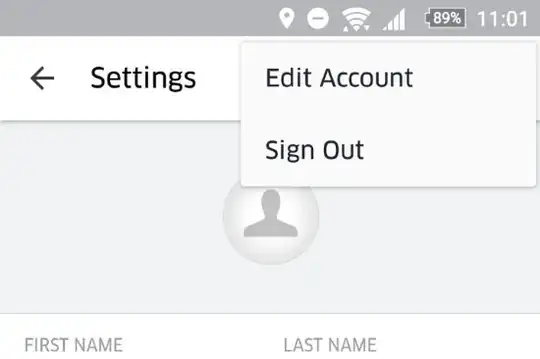
  1. For iOS users, go to SETTINGS and tap EDIT ACCOUNT under your name. For Android users, go to SETTINGS, tap the 3 vertical dots in the top right corner and select EDIT ACCOUNT.
  2. Type your account password and tap SUBMIT.
  3. Enter a new mobile number.
  4. Uber will send a text SMS with a verification code to this number. If you don’t receive the SMS within a few minutes, tap Resend.
  5. Enter the verification code and tap SUBMIT.

If this fails, then the only recourse is to contact Uber:

Berwyn
  • 29,096
  • 6
  • 75
  • 141
14

I was having this problem: I was able to find my phone number on the Settings page, but it was grayed out and I couldn't change it. I was changing from a U.S. number to a new international number.

Here's how I was able to change the number for my account:

  1. Go to Settings
  2. Click 'Sign Out'
  3. Enter new phone number
  4. Receive verification code
  5. Enter verification code into Uber app
  6. Enter email address and password for old account

My phone number for my existing account updated to the new number.

mopsled
  • 756
  • 4
  • 5
4

A more general solution to this and related problems: get a VoIP number for which you can configure forwarding, and before departing (or even after arrival, but before switching SIMs), configure your home-country cell number to forward to your VoIP number, and your VoIP number to forward to your local number in the country you're traveling to. This way, anybody can reach you on your normal number. Of course you do pay for the forwarding, but for most countries the rates are very cheap, on the order of USD $0.015-0.030 per minute.

3

You can change your phone number from within the app. Open the Settings menu option, click the three dots in the top right corner, and then click on Edit Account:

uber edit account

Enter your password and you'll be able to change your phone number, as well as your name. I've just tried it out and it works.

JonathanReez
  • 82,178
  • 90
  • 394
  • 764
3

and I also get a local sim card sometimes

I have had a lot of trouble with this for different services while traveling, to the point that now I am making the following. I created a Skype number, which is of course associated with my Skype account.

Then use that number for all/most services. You won't need the physical SIM card to do anything, so if you are abroad and lose it then no problem. You just need an internet connection and everything works.

I am still in the process of testing it in all apps and services, but Uber is the perfect case. I cannot receive SMS oficially, but when I do an UK number calls me (through skype) and does text-to-speech for me.

Edit: tried linking my Uber app but it gives an unknown error. Contacted Uber and awaiting for an answer.

Edit 2: just tried again and it's linked without problem

3

Try this. Go to edit account, scroll at bottom - you will find a sign out option. Sign out using this option. Then sign in again, creating a new account (you will be entering a new phone number). Next, when the app asks for the email ID, enter the old email ID that you were using previously. Uber will recognize this email ID, and ask you to verify it using ur password. Once verified, you are all set - Uber will update your account details the app will be using your new number

Aparna
  • 31
  • 1